




What Do Icons, Symbols, Emojis Mean on Snapchat
Introduction:From colored arrows and boxes in Chat to the hearts, flames, Bitmojis on a map, and mystery friend emojis, Snapchat is full of small icons and symbols-most of which people actually...


Introduction:
From colored arrows and boxes in Chat to the hearts, flames, Bitmojis on a map, and mystery friend emojis, Snapchat is full of small icons and symbols-most of which people actually don’t know the meaning of. They silently control how you interact, share, and keep the streaks alive every day. If you’ve ever thought, “What does this Snapchat emoji or icon mean?” then you’re definitely not alone.
This guide is for:
- New Snapchat users
- Teens and students trying to understand streaks and emojis
- Parents who want to understand their kids’ Snapchat activity
- Anyone confused by changing icons after every Snapchat update
What Are Snapchat Icons, Symbols, and Emojis?
Icons, Symbols, or Emojis: Snapchat employs icons, symbols, as well as Emojis, to express actions, status, delivery of messages, streaks, or even live location or activity. Knowledge of these aspects will ensure there are no miscommunications with regard to losing a streak, being ignored, or oversharing location.
Common Symbol Categories on Snapchat
- Friend emojis: Small emojis next to names that show how often you interact (hearts, smiles, fire).
- Streak and score symbols: Fire, numbers, and hourglass icons that track Snapstreaks and ongoing activity.
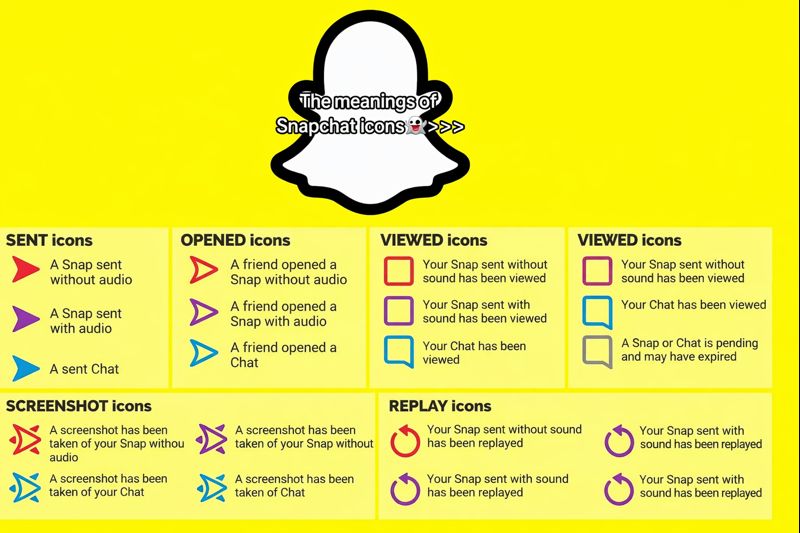
- Chat icons: Colored arrows, boxes, and circles that show whether a Snap or Chat was sent, opened, replayed, or screenshotted.
- Story and Spotlight icons: Rings, view counts, and screenshot indicators that show who watched or interacted.
- Snap Map icons: Bitmoji poses and map symbols that show where friends are and what they are doing.
Snapchat Friend Emojis
Friend emojis appear next to friends’ names and reflect your interaction patterns.
- Yellow Heart 💛: You and this person are #1 best friend—you send each other the most Snaps.
- Red Heart ❤️: You have been #1 best friends with each other for two weeks in a row.
- Pink Hearts 💕: Super BFF—#1 best friend for two months or more.
- Smiling Face 😊: One of your best friends, but not your #1.
- Grimacing Face 😬: You share a best friend; your top friend is also their top friend.
- Sunglasses Face 😎: You and this person share a mutual best friend.
- Smirking Face 😏: You are their best friend, but they are not yours.
- Baby 👶: New friend you just added.
- Sparkles ✨: Indicates you are in a group chat together.
Snapstreak Emojis (🔥, ⌛) and Score Symbols
Snapstreak icons show how long you and a friend have been sending each other Snaps every day.
Read also :Apple Music Symbols Explained: A Guide to Every Icon
- Fire 🔥: You are on a Snapstreak; you and your friend exchange at least one Snap each day.
- Number next to 🔥: Shows how many days the streak has lasted.
- Hourglass ⌛: Warning that the streak is about to end if you both do not send a Snap soon.
Sent Icons (Arrows) 📤
- Red arrow: Snap sent without audio.
- Purple arrow: Snap sent with audio.
- Blue arrow: Chat message sent.
- Grey arrow: Pending—friend request not yet accepted or you may have been removed/blocked.
Received / Opened Icons (Boxes) 📥
- Red box: You received a Snap without audio.
- Purple box: You received a Snap with audio.
- Blue box: You received a Chat message.
- Hollow red/purple/blue icons: Your Snap or Chat has been opened.
Replay and Screenshot Icons🔁📸
- Circular arrows: Your Snap has been replayed once.
- Screenshot indicator: Special arrows or icons plus a notification indicate someone screenshotted your Snap or Chat.
Typing and Presence Indicators 💬⌨️
- “Typing…” or moving dots: Friend is currently typing in the chat.
- Bitmoji head in chat list: Shows friend is present or viewing the conversation.
Story, Spotlight, and Profile Icons Explained
Stories and Spotlight use their own set of visual symbols.
Story Icons and Rings🟡📖
- Colored ring around Bitmoji/avatar: Friend has an active Story you have not watched yet.
- Grey or faded ring: You already watched that Story, or it is close to expiring.
- “+” icons: Add to My Story or public/shared Stories.
Story View and Engagement Symbols👁️📊
- Eye icon 👁️: Shows how many people viewed your Story.
- Rewatch indicator: Extra icon or count sometimes shows Story replays for certain features.
- Screenshot icon: Indicates someone captured your Story with a screenshot.
Spotlight Icons🎬✨
- Spotlight symbol: Marks short vertical public videos in the Spotlight feed.
- Share / send icon: Share a Spotlight Snap with friends or post it to your own story.
- Sound / music icon: Lets you use the audio from a Spotlight Snap.
Snap Map Bitmoji Icons and Location Symbols🗺️👻
Bitmoji Poses and Activities🧍♂️🎭
- Bitmoji on a plane, at the gym, in bed, at a party: Suggests what you might be doing based on location and time.
- Seasonal outfits (costumes, holiday clothes): Appear during events and holidays.
Location and Status Icons📍🛰️⚡
- Blue dot or glow: Friend recently active on the map.
- Shrinking circle: Last known location, not live movement.
- Lightning ⚡: Device is charging.
- Satellite 🛰️: Indicates GPS‑based location in some contexts.
Privacy and Ghost Mode🕵️♂️👻
- Ghost/hidden icon: Ghost Mode enabled; your location is hidden from friends.
- Map settings icons: Options to show location to Everyone, Friends, Select Friends, or only Me (Ghost Mode).
Icons in Lenses, Memories, and Notifications🎭🖼️🔔
Camera and Lens Icons 📷🎭
- Big circle: Shutter button to capture photos or hold for video.
- Flip arrows: Switch between front and rear cameras.
- Lens carousel: Small icons and thumbnails showing AR lenses, filters, and effects.
Memories and Save Icons 🖼️💾
- Memories icon (two cards / gallery shape): Opens saved Snaps and camera roll items.
- Download/save icon: Saves your Snap to Memories or the camera roll depending on settings.
Notifications and Badges🔔🔴
- Red/purple/blue dots: New Snaps, Stories, or Chats waiting to be viewed.
- Special app icon styles: Available to Snapchat+ subscribers who customize the app icon.
Tips to Identify
Snapchat Icons
- Pay attention to context: Where the emoji appears (friend list vs chat vs Snap Map) changes its meaning.
- Use built‑in help: Snapchat’s Friend Emoji and icon help pages explain official meanings.
- Do not panic over changes: Friend emojis, streaks, and icons can change automatically when your habits change or after updates.
- Protect privacy on Snap Map: Use Ghost Mode or limit location sharing if you do not want live location shown to everyone.
FAQ Section (Questions with Answers)
- What do the different icons, symbols, and emojis on Snapchat mean?
They show friendship levels, Snapstreaks, message status (sent, opened, replayed, screenshotted), Story views, and Map activity so you can understand interactions at a glance. - What do the yellow, red, and pink heart emojis mean on Snapchat?
Yellow 💛 means mutual #1 best friends, red ❤️ means #1 best friends for two weeks, and pink hearts 💕 mean Super BFFs for two months or more. - What do the fire 🔥 and hourglass ⌛ emojis mean on Snapchat?
Fire 🔥 shows you are on a Snapstreak, while ⌛ warns that the streak is about to end if you both do not send another Snap soon. - What do the red, purple, blue, and grey icons in Snapchat Chat mean?
They indicate whether a Snap or Chat was sent, received, opened, or is pending—red for Snaps without audio, purple for Snaps with audio, blue for Chats, and grey for pending/expired. - How can I tell if someone screenshotted or replayed my Snap?
Look for special replay arrows and screenshot indicators in the chat list or inside the conversation; Snapchat also sends notifications when screenshots are taken. - What do Snap Map Bitmoji icons mean?
Your friends’ Bitmoji positions and outfits show approximate activity (traveling, sleeping, at events) and location; additional icons can show charging status or last active time. - Can I change or customize my Snapchat friend emojis?
Yes, you can customize which emojis represent each friendship status from Snapchat settings, though the underlying logic (who is #1 best friend, etc.) stays the same. - Why do my Snapchat emojis and icons keep changing?
They update automatically based on how often you snap certain friends, whether streaks continue, and app updates that adjust designs or features. - How do I control who can see my location on Snap Map?
Go to Snap Map settings and choose between Ghost Mode, My Friends, My Friends Except…, or Only These Friends to control who can see your location. - Where can I check the official meanings of Snapchat icons and emojis?
You can visit Snapchat’s help center pages for chat icons and Friend Emojis, or use updated emoji meaning guides for the latest explanations.
Conclusion:
Snapchat can feel like a secret code at first—full of hearts, flames, arrows, and Bitmojis that all seem to signal something different. But once you understand what the icons, symbols, and emojis mean, the app becomes much easier to use and even more fun. Every symbol has a purpose, whether it is showing who your real best friends are, warning that a streak is about to end, or reminding you that someone took a screenshot.Read also:India’s Highest-Selling Cars of 2025: Full List









No Comment! Be the first one.