



Mind-Blowing Google Tricks for Epic Fun!
Curious about some of the best Google tricks around? We have some of our favorite most iconic Google easter eggs for you to try today! I am sure we all have sought Google fun Tricks at least once....

Curious about some of the best Google tricks around? We have some of our favorite most iconic Google easter eggs for you to try today!
Table Of Content
- Top Google Easter Eggs and Tricks Everyone Should Try
- Do A Barrel Roll
- Google Gravity
- Zerg Rush
- Flip A Coin
- F.R.I.E.N.D.S.
- Retro Gaming Classics
- Breathing Exercise
- Hidden Languages
- Askew
- Blink Blink!
- Festivus
- Get Back In Time
- SafeSearch
- Dark Mode
- Flights
- Non-Stop Action – It Keeps Rolling!
- Wrapping Up: Epic Google Tricks to Wow You
- FAQs
I am sure we all have sought Google fun Tricks at least once. And why not? The site is full of knowledge, surprises, and tricks! Google has somehow remained a part of our daily lives but lacks our complete focus on its full use and potential. Best fun Google tricks expose us to the fun elements and surprises of Google that reflect a significant progression of artificial intelligence.
As such, although these tricks may be viewed as unnecessary, they are a fun addition to our Google experience, which most often involves utilizing Google for daily needs such as searching for information. We may miss out on such creative features while using Google for our daily needs.
Top Google Easter Eggs and Tricks Everyone Should Try
Here is the list of 10 best fun Google Tricks:
| Fun Google Tricks | Description |
| Do A Barrel Roll | The search results page spins like a barrel roll. |
| Google Gravity | Google elements fall down due to gravity. |
| Thanos Snap | Experience the Thanos snap effect on search results. |
| Atari Breakout | Play the classic Atari Breakout game within Google Images. |
| Zerg Rush | Watch as “O” characters eat up search results. |
| Flip A Coin | Flip a virtual coin to make decisions. |
| F.R.I.E.N.D.S. | Search each character’s name for special surprises. |
| Vintage Games | Play classic vintage games in search results. |
| Breathing Exercise | Experience a guided breathing exercise animation. |
| Hidden Languages | Translate “Google” into various fictional languages. |
| Askew | The whole screen will tilt down a bit to the right. |
| Know the Meaning of Life | It shows the answer to the meaning of life. |
| Blink Blink | You will see some blinking words. |
| Festivus | You will see the aluminum Festivus pole on the side of the screen. |
| Get Back In Time | It will show you what old web pages used to look like. |
| SafeSearch | Hides bad stuff on Google so it’s safe for kids or work. You can block it or blur it. |
| Dark Mode | Makes Google dark instead of white, so it’s easier to look at in a dark room. |
| Flights | Helps you find airplane tickets on Google without going to other websites. |
| Fun Trick | Type “bvsdf” on Google to see blinking words, but it might be hard to watch for long. |
Do A Barrel Roll
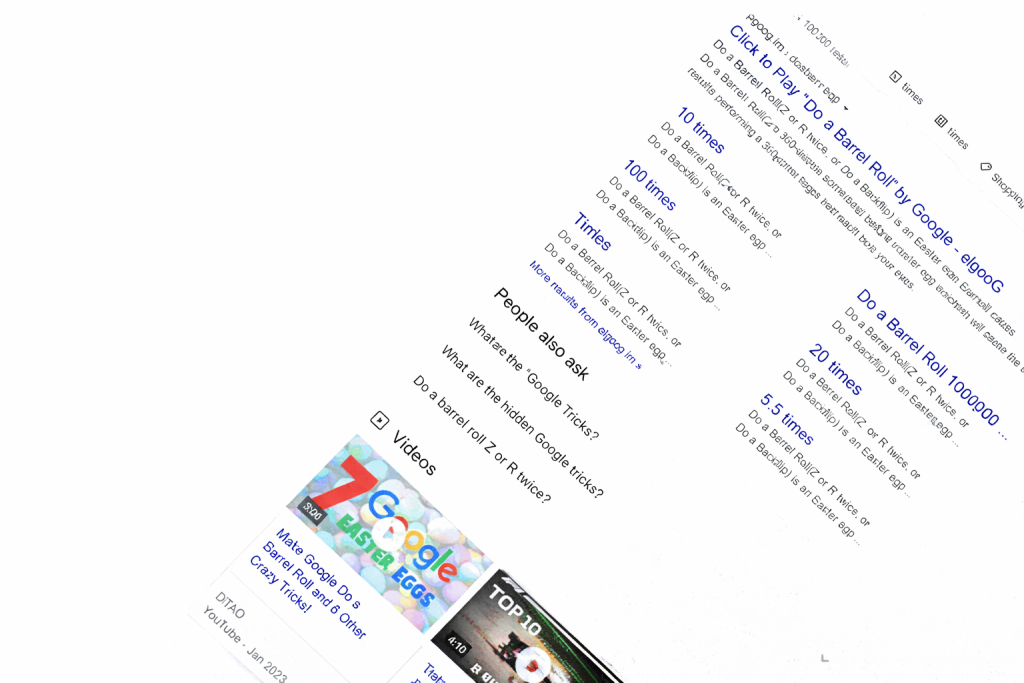
The Google Do A Barrel Roll trick is one of the oldest fun Google Tricks in the book. All this trick does is make the Google page spin around a few times before recentering itself properly. To see this, you have to type “Do a barrel roll” in the Google Search bar. The animation will be initiated right after typing that and clicking Search or hitting Enter. Don’t worry; your screen will return to normal shortly!
Google Gravity
One of the most important and strongest forces known to man is gravity. Not to forget, the entire basis of human physiology is rooted at the base of gravity. But with this trick, you can also experience gravity on Google. You simply need to type Google Gravity in the Search field. Next, click on the “I’m Feeling Lucky” button. You will be taken to the Google mock website, developed by Hi-Res, which is experimental.
You’ll also be surprised to know that the website is functioning perfectly fine, even though it’s a mock Google website. Of course, once the mock gravity effects have come into force, it will be quite difficult to navigate the website. However, it is quite cool as a fun Google trick, especially to prank someone!
Also read: Ultimate Indian Bikes Driving 3D Cheats: Unlock Epic Wins Now!
Thanos Snap
The whole world went through a shock because of the Thanos Snap Google Trick, and it first happened in 2019. It is an awesome Google trick, and it is one of the best Google tricks out there, especially if it is talking about pop culture. So, basically, what happens is that if you type “Thanos Snap” into Google’s search bar, aside from the results provided by Google, the biography of Thanos as a supervillain would appear on the right part of the screen. Next to the villain’s name would show an icon of a Gauntlet. Well, everybody knows that this is referring to the Gauntlet that has been shown throughout the movies, and if you choose this, then half of Google’s Search Engine results would disintegrate, just like what has been shown throughout the movies.Unfortunately, this trick is no longer being displayed on the actual page. If you type “Thanos Snap” on Google, you’re supposed to click on a mockup page entitled “elgooG, which is basically a mirror image of Google. You may click on the Gauntlet icon present on this page. Clicking on it would prompt the Gauntlet to snap fingers and reduce the results by 50%!
Atari Breakout
This next Google trick is for all gamers. I am pretty sure that all the gamers out there must be aware of the famous gaming venture of 1976 called ‘Atari Breakout.’ The popular video game was released by Atari Company after the success of another popular video game by the company called ‘Atari Pong.’ Although users cannot play this game today, the Google version is available to try out the game. However, this Google trick is again not direct either. In order to access the gaming venture on Google, the users have to visit the elgooG website, which is the mirror site of Google itself. Before doing that, the users must first write ‘Atari Breakout’ on the original Google Search engine itself.
You will see the mirror website on the screen. You can click on it, and the game will begin. But as a caution before attempting this game, I would like to state that this game is very addictive, and you will end up playing the game for hours!
Zerg Rush
The next nice Google trick that you should be aware of is Zerg Rush. While this is technically categorized as a gaming session for Google, it may also be characterized as a nice trick to watch. When this is activated, you shall be able to watch Os falling from the Google Search bar. The Os will jump around on the screen until it gets overwhelmed by the Google-formed Os. To react to this, you shall be required to make use of your mouse pointer to click the screen and control the O’s lifespan. Essentially, this is a nice shoot-out gaming session for you.
Unfortunately, it appears that this fun Google trick is no longer available on the Google site. To access this Google trick, you need to visit the Google Mirror site. Alternatively, you can type in the words ‘Zerg Rush’ in the Google Search box, then click on the ‘I’m Feeling Lucky’ tab. You can then access this Google trick.
Also read:
Flip A Coin
Given all the variables that go into effect in each and every one of our decisions, what we have come to find is that making a decision of any type has been a tough task. In order to simplify our decision-making process to a large extent, a large number of people have been choosing to make decisions regarding some aspects of our lives through the coin flip method. Now, what will happen if the coin is not found at a particular point of time? In such a case, the digital age will be able to prove to be of help to all of us through the Flip A Coin Google trick, through which a coin flip will be possible. The coin will have two sides just like any other coin around the world.
While this, of course, is an easter egg within itself, I would say that one of the great aspects of this particular result from Google Tricks is that, additionally, it is among some of the better ones because one can actually utilize real-life options similar to an actual coin flip and, honestly, make decisions such as this easier than they have ever been, considering our age of technology.
F.R.I.E.N.D.S.
The popular sitcom that was given the title ‘F.R.I.E.N.D.S.’ successfully completed its 25-year milestone in 2019. Keeping in consideration the importance of the popular sitcom for the topic of pop culture and the present media scenario, Google decided to pay tribute to its characters. Considering the fact that this popular sitcom comprised a huge cast of principal cast, videos were produced on the character each of them portrayed in the show.
In order to do so, you will need to type in the name of the character + friends. When you do so, you will be able to see the name of the actor who played the role + information about the actor. Next to this information will be a picture related to the character; if you click on it, you will be able to activate the special animation of the character. However, please note that this Google trick might not be working anymore due to the new update from Google. These Google tricks did break the internet when it was activated! Don’t worry if it does not work well; you can simply type in friends glossary in the Google search bar and start reading the words that were only used in the show!
Retro Gaming Classics
Well, if we were to gauge from the number of gaming Easter eggs that Google has included in its trick list, then it is for certain that the Search Engine is a huge fan of game development. Besides, retro games have really played an enormous role not only in propelling technology but also in creating different eras, for instance, if Pac-Man is what you want to take a trip down memory lane for, then Google is here to help.
A few games, such as Pac-Man, Minesweeper, and Solitaire, can be played using this trick. In order to activate this trick and access it through Google, all that is required of the user is to go to the Google Search page and type in the title of the game. For example, by writing “PAC-MAN” in the Search section, the user will be able to see a picture of Pac-Man with a “Play” button beneath it. The button can be pressed to begin playing some of these classic games.
Also read:Ultimate BGMI 120 FPS Powerhouses: Experience Silky Gameplay Now!
Breathing Exercise
We are a part of a fast-paced world where we are always forced to work hard and hustle. But though working hard is the key to a successful life, at times things get a bit too much for the mind and the heart to handle. So, if you are going through stress, anxiety, and other similar emotions, then for you there is some good news today because you can use Google to calm down and ground yourself too. Considering the gravity of the issue, one of the best Google tricks that is available to us today is certainly the technique of breathing.
The usage of this trick with Google, as mentioned above, is quite simple. This trick is added to Google’s Search Engine. For using this trick to maximum, it is required that you put ‘breathing exercise’ in Google’s Search Bar. When you hit Search, this trick will ask you to do a breathing exercise within 1 minute. Besides, you will also be given instructions on this to be followed to use this trick to maximum. Is this trick not very important, to say the least?
Hidden Languages
If you’re someone who is actually interested in pop culture phenomenons such as Star Trek and shows like Game of Thrones, then you know about the fictional languages that they portray. This is actually done in order to add authenticity and depth to the show. But then again, do you know that Google is actually fluent in these unofficial and fictional languages? Well, Google supports plenty of these fictional languages such as Klingon, Dothraki, Pig Latin, and also Pirate Language!
Of course, you can do this by searching these languages on Google anytime. You may also choose to change your browser settings to support these fictional languages. To do this, you will be required to go to the Google Search homepage and then proceed to Settings. On Settings, click on Search Settings, and then look for the Languages tab. On the Languages tab, you will also be able to find the More section. That’s where you will add these fictional languages.
Askew
Try something really funny: just type askew in Google. You will notice that the whole screen would tilt, for a while, down a bit to the right. In other words, the screen would look a bit imbalanced.
Blink Blink!
Want to do something cool? Try opening Google and typing in “bvsdf.” Words will blink on the screen. It will not be possible to see those blinking words for a very long time. Now, please close that tab and search for something else.
Festivus
That’s one amazing Google trick you’re going to love. Anytime you type “Festivus” in the Google search engine, you see the aluminium Festivus pole on the side of the screen.
Get Back In Time
Ever wondered what your favorite websites looked like before? Well, now you have the answer. Google allows you to take a step back into the day. All you need to do is type ‘Google in 1998’ in the Google search bar and you will be transported to the past.
SafeSearch
The SafeSearch is a feature of Google that helps you avoid things which are not safe for kids and also for work. It helps you avoid bad things you might see on the internet, such as adult content or frightening and violent pictures.
If you think about it, if you wanted to look at some pictures or videos on Google, there might be some things that aren’t appropriate for children to see—in other words, “grown-up” content or “scary” content. But with the help of SafeSearch, you can block those so that you only look at “safe” content.
How does it work?
Go to Google and search for “SafeSearch,” or visit this link: https://www.google.com/safesearch.
You’ll see two options:
Filter: This one completely hides the bad stuff, so you won’t see it at all.
Blur: This blurs the bad stuff around you, so you can’t see it clearly. What you can see is the message saying, “This image might not be okay. It’s blurred.” If you want to see the image clearly, you have to tap the image and click “View Image.”
In that way, you can decide what you prefer to watch.
Dark Mode
Dark Mode changes how Google looks. Normally, Google looks bright white, but when Dark Mode is on, it looks dark, but the words are light. This is better to look at when you are in a dark room.
For instance, you can imagine Google to be a book with white pages and black writing; this writing can hurt your eyes if you read in a dark room. However, Dark Mode will ensure the color of the background is black and the writing is white.
How does it work?
- Go to google.com.
- Look at the bottom right corner and tap “Settings.”
- Locate “Dark Mode” from the list and tap to enable it.
- To turn it off, tap “Dark Mode” again.
- Or, if you perform a Google search, tap the small gear/settings button at the top, and you will find the Dark Mode option there, too.
Flights
The feature in Google helps you find and book airplane tickets. You will not have to go to other websites, since everything is on Google!
Let’s say, you want to fly from one city to another. Instead of searching on a lot of websites for tickets, with Google, you can view all of the available flights, their price, and choose the best option for you.
How does it work?
- Search for “flights” in Google, or even “flight from [your city] to [another city].” Example: “flight from Delhi to Nagpur.”
- You will get a list of flights available leading to results of prices.
- You can choose the dates you want to travel and add stuff like:
- How many stops you’re okay with.
- How much you want to spend.
- How long the flight should last.
- Google also does this with a graph and calendar so you can see if the prices are cheaper on other days. The best flights for you will appear at the top; more options can be found below.
Non-Stop Action – It Keeps Rolling!
This is a fun trick on Google. If you type “bvsdf” into the search bar, you’ll see something cool—but it might be hard to watch for long because it blinks a lot.
It’s like a little game or surprise. When you type “bvsdf” on Google, the screen will show words that keep flashing on and off. It might make your eyes feel funny because it moves so much. If it’s too much, you can close the page and look at something else, like popular “how to” searches on Google.
Wrapping Up: Epic Google Tricks to Wow You
However, these gems are often hidden from the users by Google. Nevertheless, these are definitely quite fun to know about. Well, who would not want to know that for an F.R.I.E.N.D.S. fan or for an enthusiast gamer, these fun Google Tricks can definitely brighten up their day? This is exactly the reason we have chosen some of the best fun Google Tricks to be featured on this blog.
Of course, the possibility exists that Google might introduce further tricks in the future. In that case, it can be guaranteed that these tricks would also be included in the list. Until then, follow this space for further articles like this.
FAQs
What is the coolest Google trick?
Another famous Google trick is “Do A Barrel Roll,” which rolls the search results page in a barrel roll motion.
How many fun Google Tricks are in Google?
There are approximately 36 different Google Search tricks available to try.
How to trick Google search?
In order to more effectively use Google, operators which can be used include quotes for phrases, “site:” for a site, “-” for exclusion, “imagesize:” for a size, “filetype:” for a file, “*” as a wildcard, and “OR” or “AND” for searches.
What is rare with Google?
Rare with Google is an online program that focuses on the promotion and support of less represented creative individuals.
What has the highest results on Google?
YouTube is the most searched item on Google, followed by Amazon, Facebook, Google, Weather, and Gmail.
Does Google perform gravity tricks?
Yes, by typing “Google Gravity” and pressing “I’m Feeling Lucky,” you will see Google’s elements falling because of gravity.
What is Google Secret 42?
The number 42 is a popular figure among readers of the book “The Hitchhiker’s Guide to the Galaxy” by Douglas Adams. In the book, it is said to be the answer to the ultimate question to life, the universe, and everything, according to a supercomputer.








No Comment! Be the first one.