




Master Threads Search: Full Step-by-Step Guide
Introduction: Why Threads Search is Essential Today Instagram has truly emerged as a real Twitter competitor by giving Threads search a serious speed boost—now it’s quick, easy, and powerful!...

Introduction: Why Threads Search is Essential Today
Instagram has truly emerged as a real Twitter competitor by giving Threads search a serious speed boost—now it’s quick, easy, and powerful! Say goodbye to endless scrolling: filter by date, search a particular account, and organise results by Top (trending) or Recent (newest). No more searching for the crucial post, account, or trend—unlike on clunky X.The definitive Threads search tutorial provides detailed solutions for all platforms (iOS, Android, web), and mobile platforms are particularly adept at advanced filtering.
Table Of Content
- Introduction: Why Threads Search is Essential Today
- Threads Search Explained
- How to Search Profiles
- Mastering Keyword & Post Searches
- Advanced Filters: Dates, Profiles & More
- Date Range Magic
- Profile-Specific Power
- Pro Search Tips Every User Needs
- Threads Search vs X Comparison
- What’s Coming for Threads Search
- FAQ Section (Questions with Answers)
- Conclusion: Search Like You’ve Always Wanted
Threads Search Explained
Let’s keep it simple search lives in this magnifying glass icon (bottom bar on mobile, top right on web). Click on it, and three major things happen:
- Keyword Search: Enter any keyword → click “Search [keyword]” → view posts & accounts
- Top Tab: Algorithm shows popular & relevant results (awesome for trends)
- Recent Tab: Chronological view newest first (ideal for breaking news)
What sets Threads apart from Instagram: Threads’ text conversations are indexed very deeply, so “Threads search tips” shows actual threads, not just pictures/hashtags. Mobile apps are way ahead on this one; the web is still playing catch-up on basic keyword-only search (Jan 2026).
Pro tip: Always look at both Top and Recent. Top shows you influencers, while Recent shows you grassroots activity.
How to Search Profiles
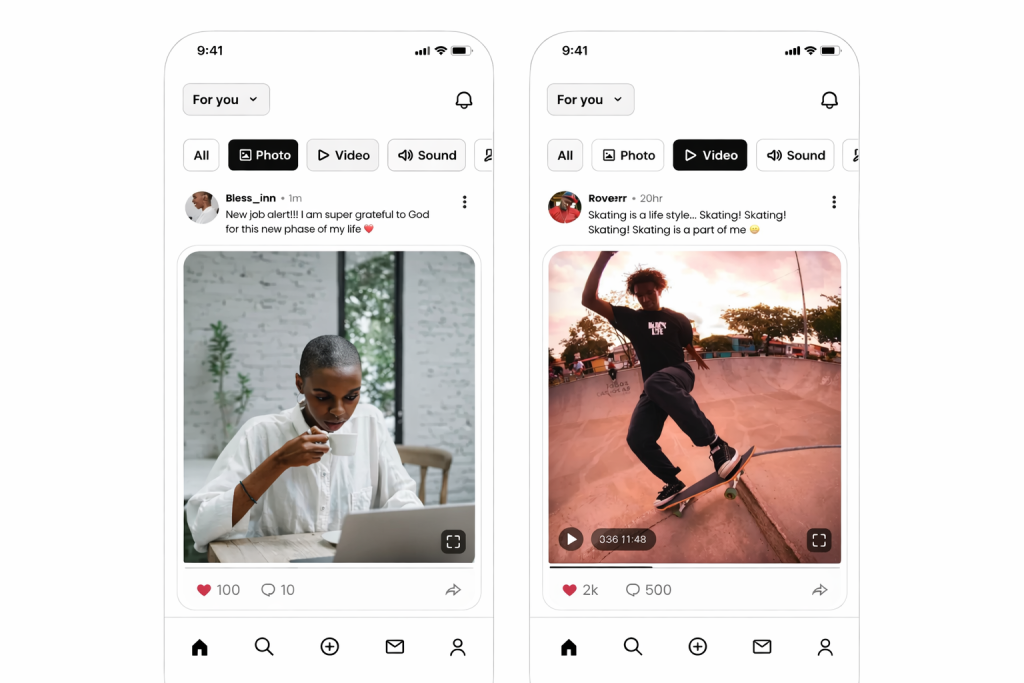
People search = Threads’ superpower. Unlike Instagram, where hashtag search is a disaster and also provides a clean people search with great suggestions.
Step-by-step profile search:
- Tap search (🔍)
- Enter exact username or partial name → see autocomplete
- Browse search results: “People” section lists search results & similar accounts
- Tap profile to Follow, DM, or view posts instantly
Hidden feature: As you search for “marketing,” Threads automatically recommends top creators without you having to search. Unlike X, where you have to battle bots.
Mass follow: “Search tips” → browse suggested profiles → follow 10 influencers in 30 seconds. For creators, this helps find collaboration partners quickly.
Mastering Keyword & Post Searches
Read also:ChatGPT Prism Explained: The Truth, Uses & Why It’s Trending Everywhere (2026)
Keywords open conversations. Search “AI art” → “Search for AI art” → BAM! thread dump.
Three kinds of results you’ll see:
- Posts: Complete conversations (including quote posts)
- People: Participating voices on that topic
- Top vs Recent toggle: Toggle during search
Actual example: Search “iPhone 18 leaks” during launch week. Top = major accounts with news. Recent = regular folks with pics. Both are useful.
Advanced Filters: Dates, Profiles & More
Threads’ 2025 update dropped game-changing filters (mobile-only for now). Tap the sliders icon after any search:
Date Range Magic
- After 2026: Find posts since launch/event
- Before 2026: Dig up old predictions/reactions
- Use case: “Threads updates after Dec 1” = all new features explained
Profile-Specific Power
- From [username]: Their posts + that keyword only
- Example: “From @mrbeast gaming” = exact content without feed noise
Pro workflow: Search “SEO 2026” → Filter “After Jan 1” → “From influencers” → pure gold for marketers.
Limitation: No exact phrases/hashtags yet (use quotes sparingly). Web users: bookmark mobile for filters.
Pro Search Tips Every User Needs
11 quick wins to 10x your searches:
- Trending hack: Search broad terms (“tech”) → Top tab = pulse of platform
- Competitor spy: “[brand] review” + Recent = customer sentiment live
- Collab hunt: “Looking for [niche] creator” + date filter
- No results fix: Spelling → Recent tab → app update
- Save searches: Pin important keywords (star icon)
- Batch research: Search → Screenshot results → Notion/Airtable
- Morning routine: 5 trending searches = content ideas all week
- Avoid bots: Recent tab > Top for authentic voices
- Cross-post track: Search your username + quotes
- Event coverage: “[conference] live” during events
Weekly audit: Past week brand mentions
Creators: These = content calendars. Marketers: These = social listening.
Threads Search vs X Comparison
| Feature | Threads | X | Winner |
| Date filter | ✅ Easy sliders | ✅ Advanced operators | Tie |
| Profile search | ✅ Smart suggestions | ✅ Lists + mute | Threads |
| Keyword trends | ✅ Top tab magic | ✅ Trending topics | X |
| Mobile UX | ✅ Native feel | ✅ Good but cluttered | Threads |
| Hashtags | ❌ Coming soon | ✅ Established | X |
Switchers: Threads feel cleaner, especially for Instagram-adjacent creators. X wins complex operators.
What’s Coming for Threads Search
Meta’s testing:
- AI summaries: “Show me AI art trends summary”
- Hashtags: Finally (Q1 2026?)
- Location: Early tests
- Web filters: Mobile parity soon
Watch: Threads Analytics (creators) may tie into search data. [Based on 2025 test leaks]
FAQ Section (Questions with Answers)
- Searching on Threads?
Click 🔍 icon, type in keyword or profile, and switch between Top/Recent tabs.
- Advanced search filters on Threads?
On mobile, use sliders to filter date ranges or type in “From [profile]” for accuracy.
- Searching posts on Threads by particular dates?
Click Filters, select After/Before dates—great for summarizing events.
- Finding profiles on Threads?
Search for username suggestions, then follow immediately.
- Searching on Threads compared to Twitter/X?
Threads uses dates/profiles; X uses advanced search operators.
- No search results appearing on Threads?
Check for spelling errors, use the Recent tab, or update app.
- Threads keyword search: Top vs. Recent?
Top showcases trending posts from influencers; Recent displays latest in real
Time.
- Searching posts from a particular Threads profile?
Click Filters > “From [@username]” + your keyword.
- Searching on web vs. mobile?
Web searches only allow basic keyword searches; mobile allows filters.
- Future improvements to search on Threads?
Testing AI-generated summaries, hashtags, and location filters soon.
Conclusion: Search Like You’ve Always Wanted
Threads search threads:“cute but basic” to “X challenger.” Expert microblog search: complete step-by-step tutorial equips you with profiles, keywords, dates, filters, and more to reduce noise and maximize signal.
Authors: Collab search over. Marketers: Unlock social listening. Casual users: Never miss a conversation again.
What’s your“killer search”? share it in the comments. Share with new Threads users.for more educational news subscribe newssy.in–Thrilling NVIDIA $2B AI Power Play: Perfectly Timed CES Chip Breakthrough






No Comment! Be the first one.