




All Monopoly GO Icons and Symbols Explained – Complete Guide
The Monopoly GO board is crowded with various icons and symbols, but you won’t be able to get anything out of that without having any idea about their significance. The following guide is designed to...

The Monopoly GO board is crowded with various icons and symbols, but you won’t be able to get anything out of that without having any idea about their significance. The following guide is designed to help you figure out what each and every icon means in Monopoly GO, whether it appears on the main screen, in the vault, events, or stickers.
Table Of Content
- Understanding Monopoly GO Icons and Their Purpose
- Key Interface Icons Every Player Should Know
- Money Stack Icon – Track Your In-Game Cash
- Hammer Icon – Construction and Upgrades
- Go Button Icon – Start Rolling the Dice
- House Icon – Manage Your Properties
- Handshake Icon – Friends and Gift Exchange
- Album Icon – View Your Sticker Collection
- Main Icon – Access Settings and Options
- Shield Icon – View Your Protection Status
- Dice Icons – Free Rolls and Auto Play
- On‑Board Icons and Symbols
- Crosshair Icon – Targeting Opponent Landmarks
- Shield on a Landmark – Protected Landmarks Indicator
- Building / Three‑Dot Icon – Landmark Levels and Progress
- Notepad Icon – Daily Quick Wins Tasks
- Event and Tournament Icon
- Vault Icon – Vault Events
- Sticker and Album Symbols
- Sticker Pack Icon – Unlock And Open Packs
- Star Icons on Stickers – Track Stickers Set Completion
- Vault Icons – Sticker Based Rewards
- Confusing Symbols and Hidden Meanings
- “M” Guy Time‑Limited Offers
- Event Banners Colors – Indicating Priority Events
- Plus Icon – Upgrades and Bonus Rewards
- Smart Ways to Use Icons for Better Gameplay
- Step 1 – Daily Icons Check
- Step 2 – Prioritize High‑Reward Events
- Step 3 – Utilize Shields and Construct Strategically
- Step 4 – Maximize Your Stickers
- Conclusion
Understanding Monopoly GO Icons and Their Purpose
Monopoly GO icons and symbols serve as the visual vocabulary of the game. These icons provide you with instant recognition of what is happening. Are you handling your coins? Shields? Events?
Failure to notice the Monopoly GO icons and symbols means you’ll be missing out on easy wins, attacking your allies during an inappropriate time, and wasting your free dice rolls. Learning about Monopoly GO icons and symbols will give you the quickest route to transforming your “lucky” game play into a winning one.
Key Interface Icons Every Player Should Know
This is where you’ll find those icons that remain consistent on your home screen as well as inside the menu. Knowing these icons is the first step towards learning all the Monopoly GO icons and symbols.
Money Stack Icon – Track Your In-Game Cash
- This icon refers to your in-game cash for Monopoly GO.
- This icon helps you keep track of your money for buying houses, hotels, and landmarks.
Hammer Icon – Construction and Upgrades
- This icon refers to your build menu.
- The hammer icon will help you build and upgrade your buildings in order to boost their profitability in the game.
Go Button Icon – Start Rolling the Dice
- This icon is the “roll” icon.
- This icon helps you roll the dice in the game to get started playing.
House Icon – Manage Your Properties
- This icon is your property management menu.
- This icon will enable you to keep track of the different colors you have bought in order to plan your future purchases.
Handshake Icon – Friends and Gift Exchange
- The handshake icon is your friends menu.
- Using this icon, you can exchange gifts such as dice and stickers with your friends.
Album Icon – View Your Sticker Collection
- This icon represents the sticker album.
- This icon helps you keep track of the sets you’re close to completing and the ones you’re missing.
Main Icon – Access Settings and Options
- The “hamburger” style menu icon will open the main menu.
- This is where you’ll find access to settings, accounts, help, and more.
Shield Icon – View Your Protection Status
- The orange shield icon will show you the amount of shields you have.
- Shields will protect your landmarks from other players landing on railroads and targeting your board.
Dice Icons – Free Rolls and Auto Play
- The green dice icon will typically indicate you have free dice from events, gifts, or daily rewards.
- The green “Auto Roll” dice icon will skip animations and roll dice quickly.
On‑Board Icons and Symbols
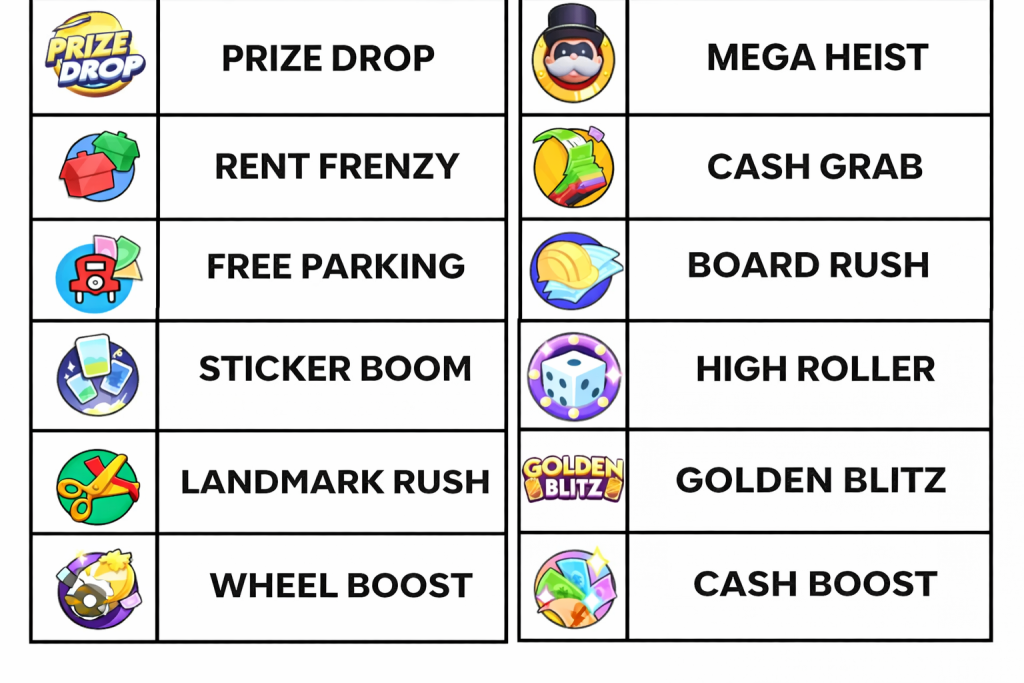
Upon landing on the board, there are more icons and symbols of Monopoly GO that you can encounter that will affect your play in a great way.
Crosshair Icon – Targeting Opponent Landmarks
- This is a crosshair icon that is used when you click on any player’s board while you are on a railroad tile.
- This indicates the landmark that you will attack.
- If you succeed in hitting the landmark, you will be rewarded.
Shield on a Landmark – Protected Landmarks Indicator
- This shield icon will show you if your landmarks on the board are safe from attacks within a turn.
- Although you manage to attack the landmark, a small reward will still be given to you.
Building / Three‑Dot Icon – Landmark Levels and Progress
This building icon with three dots on it is used for landmarks on the board.
- The dots symbolize how many upgrades you already have for each landmark.
- There is a limit of three dots on it.
Level Icon – Track Your Player Progress
- This yellow M inside a blue star icon is related to your level in the game.
- It will gradually fill up as your level increases.
- Once the icon fills up, you will level up.
Notepad Icon – Daily Quick Wins Tasks
- The notepad logo with a tick mark will help you find the Quick Wins tasks.
- These tasks will provide you with rewards like emojis, stickers, money, and dice rolls.
Event and Tournament Icon
Monopoly GO hosts various events and tournaments with their distinct sets of icons and symbols.
Vault Icon – Vault Events
- This safe box icon represents events for rewards within the vault.
- There are normally three types of vaults, all containing different rewards inside.
Heist Reward Icons – Diamond, Cash, and Coin Values
- These stamp icons indicate the rewards that you can get from events involving Bank Heists.
- Diamond Ring
- The icon indicates that the player would get the highest reward from the heist.
- Money Stack (3)
- It indicates that you will achieve a high reward for your heist.
- Silver M (1)
- It means that the reward would be small for your heist.
- If you collect three icons in a row, you will receive these rewards.
Truck Icon – Tournament and Rally Events
- The icon indicates events related to tournaments and rallies.
- Such events are special and offer unique in-game currencies.
Special Event Icons – Limited-Time Game Modes
- Each event, like Golden Blitz, Adventure, Treasure Hunt, etc., has an event-specific icon logo.
- The icon is visible on the event page, game board, and map tab..
Sticker and Album Symbols
Stickers play a pivotal role in the meta of Monopoly GO, and their symbols as well as those used to represent packs are as important as any board symbols.
Sticker Pack Icon – Unlock And Open Packs
- The sticker-pack symbol represents the sticker packs available for opening.
- Packs of different colors (blue, green, pink, yellow, and purple) include stickers of different rarities.
Star Icons on Stickers – Track Stickers Set Completion
- On the sticker set screen, small stars represent the number of stickers you’ve already collected.
- Collecting entire sets frequently gives you additional rewards such as money, dice, and other stickers.
Vault Icons – Sticker Based Rewards
- Certain vaults and wheels provide stickers and sticker packs as rewards.
- A green vault symbol obtained through sticker-based rewards usually consists of Monopoly money and one green pack.
Confusing Symbols and Hidden Meanings
Several Monopoly GO symbols can easily be misinterpreted; let’s decode some of the cryptic Monopoly GO icons and symbols explained.
“M” Guy Time‑Limited Offers
- This is the “M”-guy-with-timer icon. This typically indicates limited-time offers or quests.
- They show up during certain events and vanish once the clock runs out.
Event Banners Colors – Indicating Priority Events
- The color icons/banners indicate the events with high priority at that time.
- Purple-bordered icons, particularly, are an indication of rewards in the form of tournaments or stickers.
Plus Icon – Upgrades and Bonus Rewards
- A “+” sign on a particular sticker or landmark may indicate either an upgrade or a reward.
- This needs to be determined from the tooltip or pop-up message.
Smart Ways to Use Icons for Better Gameplay
Knowledge about all the icons and symbols in Monopoly GO is useless unless you apply them effectively.
Step 1 – Daily Icons Check
- Once the game starts, perform an initial check of all important icons in the game:
- Inspect money stack and shields icons.
- Analyze event icons and tournaments.
- Unlock and perform at least one task under Quick Wins (notebook icon).
Step 2 – Prioritize High‑Reward Events
- Initially, concentrate on activities showing high reward icons like diamonds, rings, or large cash stacks like vaults, bank heists, and tournaments.
Step 3 – Utilize Shields and Construct Strategically
- If your board shows low shields, avoid attacking or postpone it until you are fully replenished with shields.
- Use hammer and green house icons to construct set-based properties, not spreading money randomly across the board.
Step 4 – Maximize Your Stickers
- When you get closer to completing sticker packs, unlock them (star icons can help).
- Save rare sticker packs for sets which need only one or two stickers to complete.
Conclusion
All Monopoly GO Icons and Symbols Explained – Knowing How to Exploit Them makes Monopoly go from being an obscure collection of symbols to something that actually works in your favor. Using the money stack, hammer symbol, heist symbols, vault icons, and even stickers‑set stars will help you collect more dice, coins, and stickers.
If this was a helpful post, consider sharing it with your friends and pinning it as your Monopoly Go icons cheatsheet. Next up: “How to Get Dice & Stickers in Monopoly GO for Free.”And if you found this article helpful, share it with your friends for more gaming news subscribe newssy.in.






No Comment! Be the first one.